
How To Get Free Access To NFPA Standards
START HERE
Clicking on this link will open a new window so you can gain free access by following the twelve steps below.
Step 1
Click on “Codes and Standards”

Step 2
Click on “Free Access”

Step 3
Click on “View list of NFPA’s codes and standards”
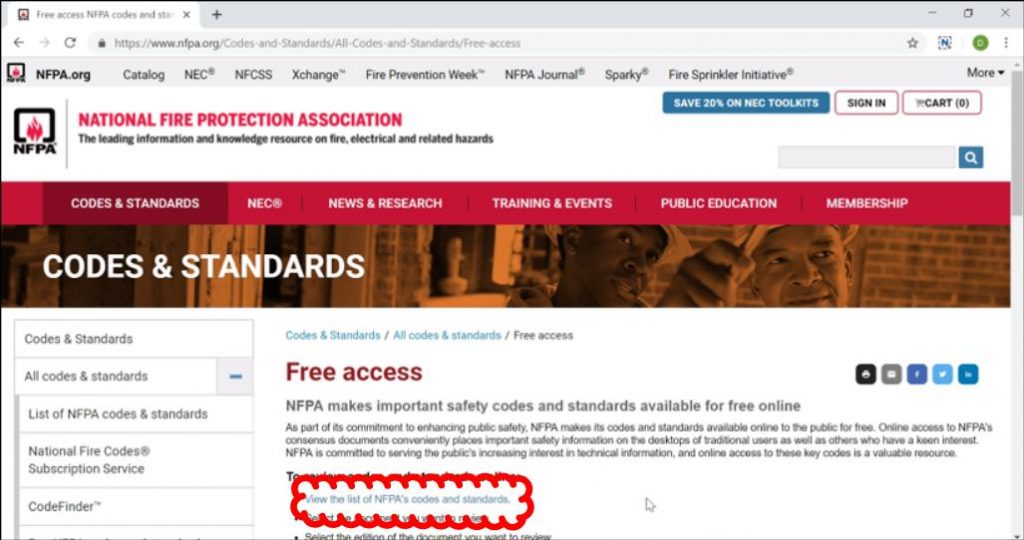
Step 4
Scroll and Click on the standard you need to view.
Step 5
Click on “Free Access”
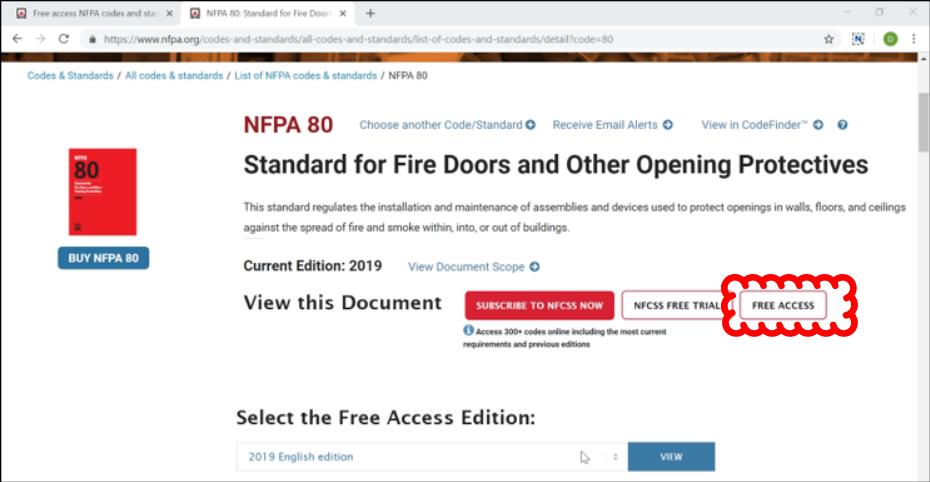
Step 6
Click on “View”
(“View” appears only after clicking “Free Access”)

Step 7
Click on “Sign in” or “Create a Profile” If you “Sign in” you will have instant access to the Standard you selected. “Create a Profile” is only if you have not created one yet.

Step 8
Enter your email/password and click on “Continue”
Remember to write down the email and password you used so next time you can just “Sign in”

Step 9
Complete the *required fields and click on “Save”

Step 10
An email confirmation is required. Go to your email account and open up the message from NFPA. Within the email from NFPA, click on “Click here to validate your email address.
After confirmation of your email address, you will be redirected back to this page on the NFPA website. Once back on the NFPA website, click on “Free Access”.
Step 11
Click on “View.”
(“View” appears only after clicking “Free Access”)
Step 12
Click on “I AGREE” and you have free access.
